


Effective date: November 9, 2026
The Phoenix Catalyst Inc (“we”), a 501(c)(3) nonprofit, sends text messages to volunteers, attendees and users of the Phoenix Community Calendar app and website who have agreed to receive them. The program is called “The Phoenix Catalyst text messages.” Texts come from (888) 639-3230. This page explains how you sign up, what we send, how often, and how to stop.
What we send
- Event reminders and changes.
- Volunteer shift confirmations.
- Volunteer application updates.
- Sign-in verification codes for the Phoenix Community Calendar app and website, sent only when you request one.
Message frequency varies. Msg & data rates may apply. No marketing, fundraising or third-party messages.
How you sign up
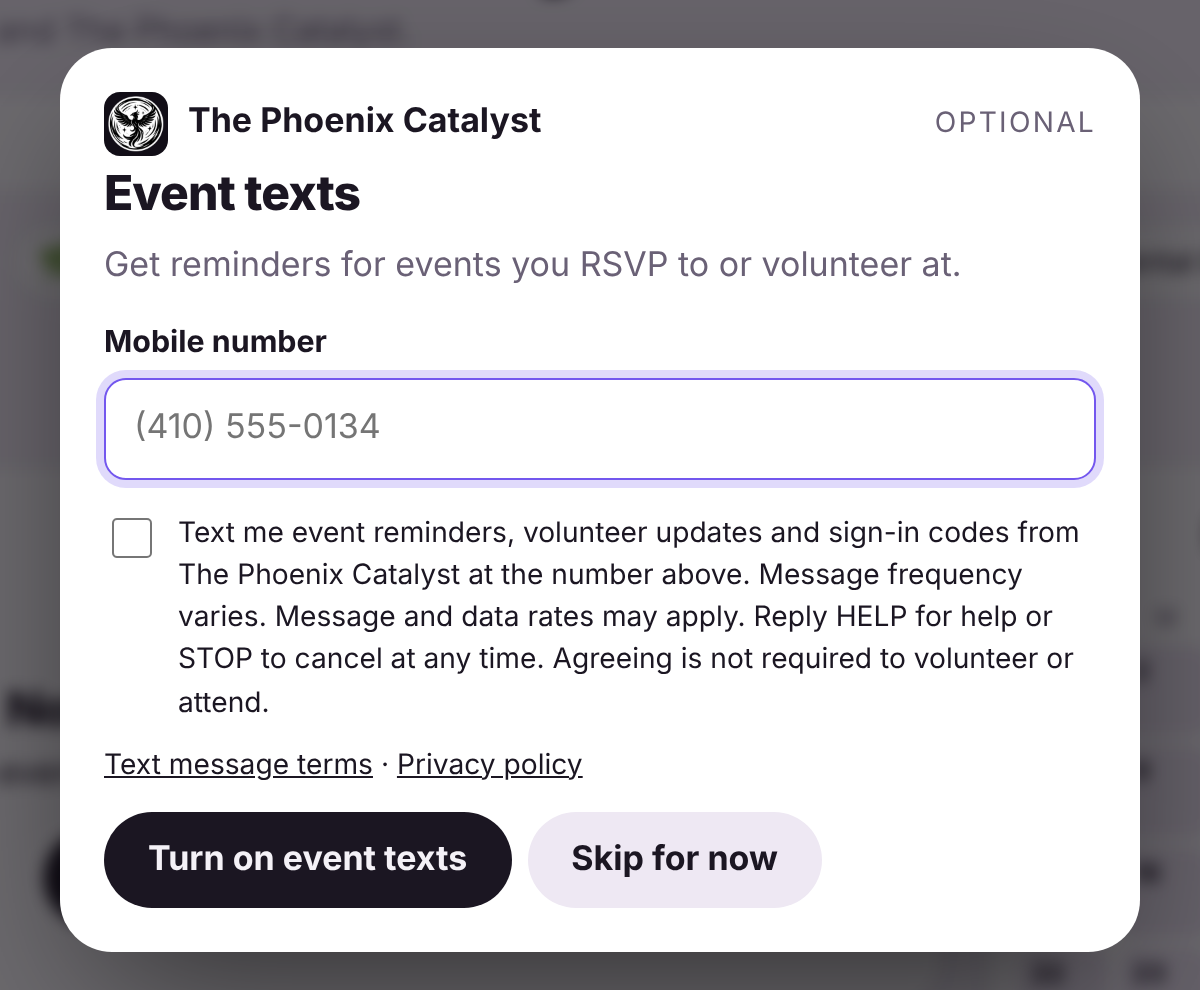
Texts are off until you turn them on. Right after you create a Phoenix Community Calendar account on the website, an optional “Event texts” step asks for your mobile number. You can skip it, or turn texts on later from Account → Event texts on the website or the Event texts card in the app’s Account screen. Each place has the same box, unticked to begin with. It reads:
“Text me event reminders, volunteer updates and sign-in codes from The Phoenix Catalyst at the number above. Message frequency varies. Message and data rates may apply. Reply HELP for help or STOP to cancel at any time. Agreeing is not required to volunteer or attend.”
After you opt in, you get one text: “The Phoenix Catalyst: you’re signed up for event and volunteer texts. Msg frequency varies. Msg & data rates may apply. Reply HELP for help, STOP to opt out.”
Agreeing to texts is never required to volunteer or attend an event.
How often
Message frequency varies with the events and shifts you sign up for and the codes you request.
How to stop, and how to get help
- Reply STOP to stop all texts. CANCEL, END, QUIT, UNSUBSCRIBE, STOPALL, REVOKE and OPTOUT also work. You’ll get one message confirming you’re unsubscribed.
- Reply START or UNSTOP to sign up again.
- Reply HELP to get this message: “You’re receiving texts from The Phoenix Catalyst. For help, email thephoenixcatalyst@outlook.com or visit thedragonflycatalyst.org/phoenix-catalyst/sms-terms. Reply STOP to opt out. Msg & data rates may apply.”
Costs
Msg & data rates may apply, depending on your mobile plan. We don’t charge for texts.
Your privacy
Your phone number and text opt-in data are not shared with or sold to third parties or affiliates for marketing or promotional purposes. We use them only to send the messages described on this page.
Carriers are not liable for delayed or undelivered messages.
What the sign-up box looks like
Contact
The Phoenix Catalyst Inc · EIN 41-3050300 · 7428 Oakland Mills Rd, Columbia, MD 21046 · thephoenixcatalyst@outlook.com
Questions or help: reply HELP to any text, or email thephoenixcatalyst@outlook.com.